
Dynamic Stamp Special Features
If you've ever used a custom dynamic stamp that requires more than one input, you most likely used a popup dialog, rather than the one field input app.response() function. If you've ever programmed a dynamic stamp you know that the script for the user response is stored in the custom calculation area of one of the fields in the stamp file.
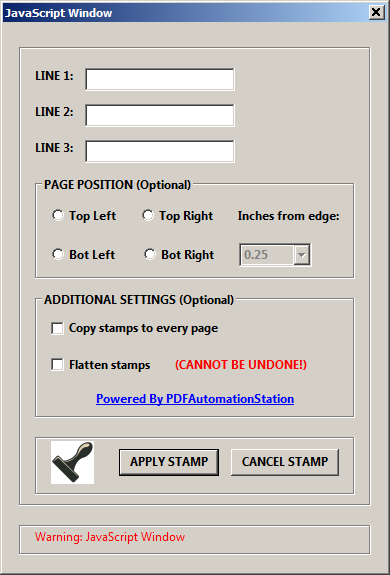
- Cancel The Stamp
- Position The Stamp In A Specific Location
- Copy The Stamp To Every Page In The Document
- Flatten The Stamp Into The Document
The features in the last three bullet points above are not new for us. What is new is that we can now build these features right into the dynamic stamp instead of having to create a custom toolbar button or menu item so these functions can execute on a document that already contains the stamp. This was an extra step is now eliminated as the functions are executed directly from the stamp rather than from a separate toolbar button or menu item.
CANCEL THE STAMP
We never used to put cancel buttons on our stamp dialogs because they would cancel the dialog but not the stamp so there was not point. We can now cancel the stamp directly from a dynamic stamp dialog by clicking the cancel button.
POSITION THE STAMP IN A SPECIFIC LOCATION ON THE PAGE
Again, we used to have to do this with toolbar buttons or menu items. We can now place the stamp in a specific location on the page and even allow the location to be selected directly from the popup dialog of the stamp.
COPY THE STAMP TO EVERY PAGE IN THE DOCUMENT
We have created many toolbar buttons or menu items that copy a stamp to every page of the PDF document but there is no longer a need for this extra step. We can now copy the stamp to every page, or a range of pages, in the document.
FLATTEN THE STAMP INTO THE DOCUMENT
Ditto with the flattening function. No more toolbar buttons or menu items. This feature allows the stamps to be flattened right into the document, which means they are no longer stamps and become part of the PDF itself, not a separate annotation. This is a good security feature and prevents the easy manipulation or deletion of the image.
All of these features can be used separately or in combination with the others. If you would like a quote for a custom built dynamic stamp using some of the features outlined here, please complete the contact form to start the conversation and one of our programmers will be in touch.