How Do I Change The Default Folder For The 'Save As' Function in Acrobat® or Reader®?
This question comes up all the time and until now, the answer has usually been "You Can't". When you select Save As from the Adobe® Toolbar, the folder in the save window usually defaults to the same folder from which the PDF was opened.
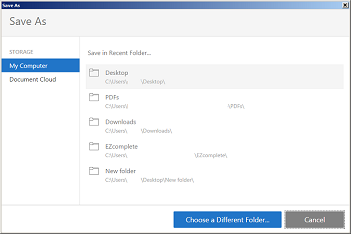
This can be frustrating, especially if you need to save several PDFs to another folder that is way too many mouse clicks away. Both Acrobat Pro DC and Acrobat Reader DC have made improvements in this area with the Save in Recent Folder feature.
However, if you have pre-DC versions of these programs you're out of luck. So we developed a custom menu item that puts another Save As command, Save As…(Remember Folder), under the File command on your Acrobat or Reader toolbar. When you use the custom Save As command the default folder will always be the last folder you saved a PDF to using this command. It doesn't matter whether you close down your PDF viewer or whether you close down your computer completely. Acrobat remembers. Reader remembers.
WATCH VIDEO DEMONSTRATION: